
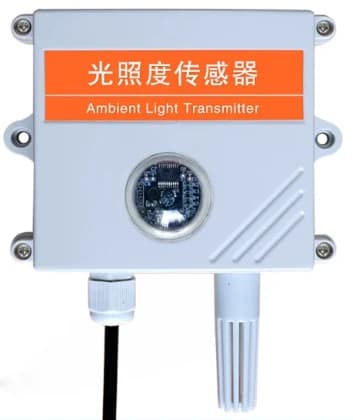
Illuminance Sensor
RS485 illuminance sensor for real-time ambient light measurement in smart greenhouses, warehouses and indoor livestock environments. It transmits illuminance readings through Modbus RTU, with configurable device address and baud rate for integration into monitoring systems.
Description
RS485 illuminance sensor for real-time ambient light measurement in smart greenhouses, warehouses and indoor livestock environments. It transmits illuminance readings through Modbus RTU, with configurable device address and baud rate for integration into monitoring systems.
- Connectivity and interfaces: RS485, Modbus RTU
- Power supply: 9–24 V DC
- Average power consumption: 0.12 W
- Illuminance range: 0–200000 / 65535 lux, as listed in the supplied manual; confirm range for the ordered version
- Resolution: 1 lux
- Accuracy: ±5%
- Operating conditions: −40 to +80 °C; 0–80% RH
- Output: RS485, Modbus RTU
- Communication settings: Default 9600 bit/s and address 0x01; configurable baud rate 2400–115200 bit/s
Specifications
Review the main configuration points for Illuminance Sensor, including control method, network, monitoring, interfaces, and deployment fit.
- Power supply
- 9–24 V DC
- Average power consumption
- 0.12 W
- Illuminance range
- 0–200000 / 65535 lux, as listed in the supplied manual; confirm range for the ordered version
- Resolution
- 1 lux
- Accuracy
- ±5%
- Operating conditions
- −40 to +80 °C; 0–80% RH
- Output
- RS485, Modbus RTU
- Communication settings
- Default 9600 bit/s and address 0x01; configurable baud rate 2400–115200 bit/s
Application scenarios
- Ambient light monitoring in smart greenhouses and warehouses.
- Indoor environment monitoring in breeding and livestock facilities.
Product buyer FAQ
What is Illuminance Sensor used for?
RS485 illuminance sensor for real-time ambient light measurement in smart greenhouses, warehouses and indoor livestock environments. It transmits illuminance readings through Modbus RTU, with configurable device address and baud rate for integration into monitoring systems.
Which specifications should I check before ordering?
Check the listed supply voltage, interfaces, communication network and regional configuration against your project requirements. Ask NetJoin to confirm any unspecified options or differences between document revisions.
Where can I find the product datasheet?
Use Download Datasheet on this page to review the supplied product document, including installation and configuration details.
Next steps
Share quantity, interface, communication method, location, and platform requirements so the engineering team can confirm fit.